
How to Switch Between Plans
VoxWrite offers flexible pricing options, and you can easily switch between plans depending on your needs. For example, you might have both a Subscription Plan and a Lifetime Plan (BYOK - Bring Your Own Keys), and want to switch between them.
This guide will show you how to change your active plan in just a few clicks.
Understanding Your Plan Options
Before switching, here's what each plan offers:
| Plan Type | Description | API Keys |
|---|---|---|
| Subscription Plan | Monthly billing, we handle all AI processing | Not required |
| Free Trial | Limited trial period of subscription features | Not required |
| Lifetime Plan (BYOK) | One-time payment, use your own API keys | Required |
| Free Plan | Plan with limited functionality, use your own API keys | Required |
How to Switch Plans
Step 1: Open Payment Settings
- Click the VoxWrite extension icon in your Chrome toolbar
- Open the Settings
- Navigate to the Payment tab
Step 2: Select Your Desired Plan
In the Payment tab, you'll see all available plans for your account.
To switch to Lifetime Plan (BYOK):
- Click on Free Plan or Lifetime Plan option
- The plan will activate immediately
- The API Keys tab will now become available
- You can now enter your own OpenAI or Anthropic API keys
To switch to Subscription Plan:
- Click on Subscription Plan option
- If you have an active trial, click Enable Trial
- If you're a paying subscriber, the plan activates immediately
- VoxWrite will handle all AI processing for you
Step 3: Configure Your Plan (if needed)
If you switched to Lifetime Plan:
- Go to the API Keys tab
- Enter your OpenAI or Anthropic API keys
- Learn how to get API keys →
If you switched to Subscription Plan:
- No additional configuration needed
- Start recording immediately
- Your usage is covered by your subscription
Example: Switching from Trial to Lifetime Plan
Let's say you're currently using a subscription trial, but you want to switch to your Lifetime Plan with your own API keys.
Current situation:
- Active: Subscription Trial
- Want: Use Free Plan with own API keys
Steps:
- Go to Payment tab
- Select Free Forever
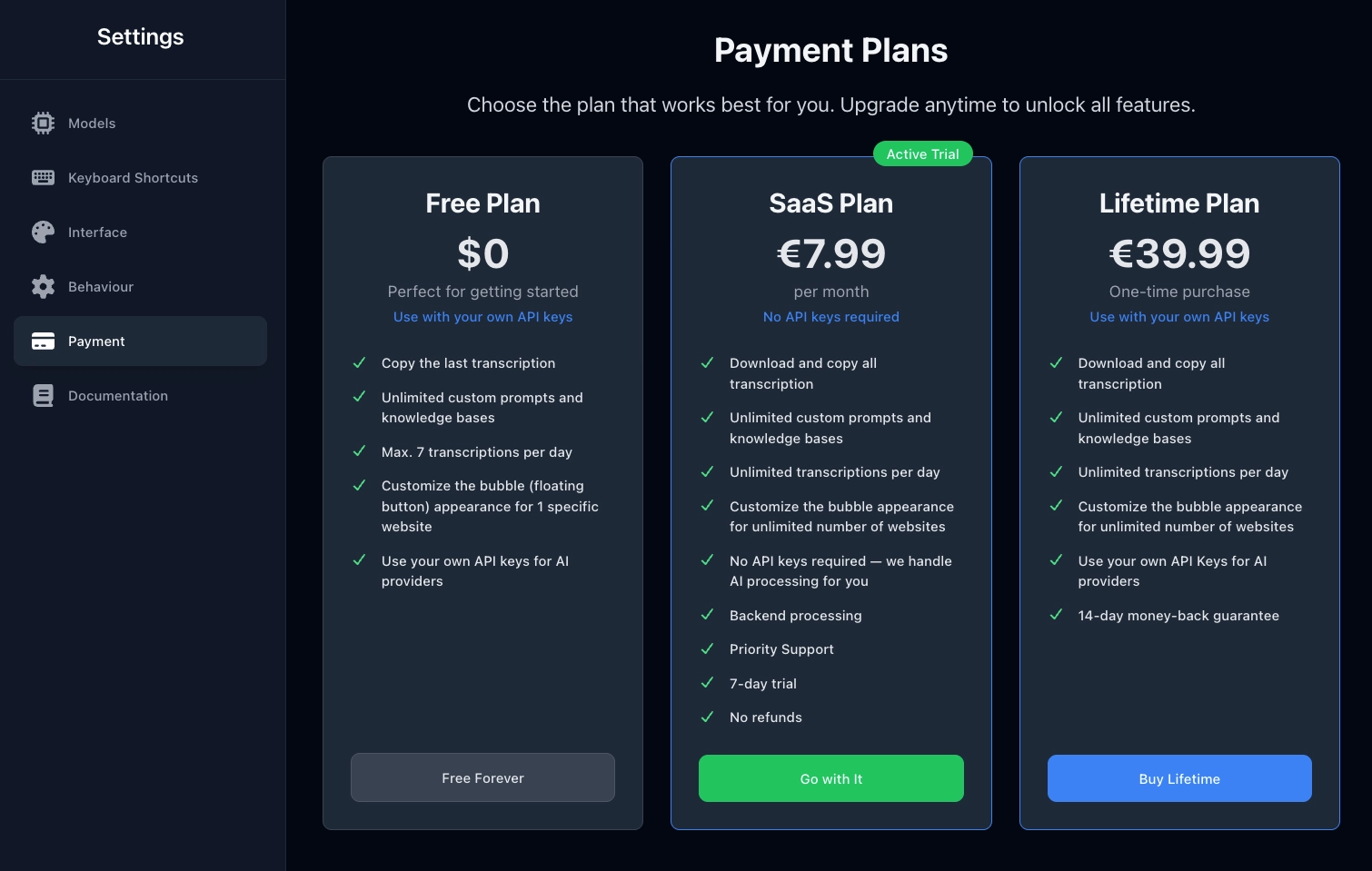
- Go to API Keys tab (now available)
- Enter your API keys
- Start using VoxWrite with your own keys
Example: Switching from Lifetime Plan to Subscription
Now let's say you want to switch back to your subscription.
Current situation:
- Active: Lifetime Plan (using own API keys)
- Want: Use Subscription Plan
Steps:
- Go to Payment tab
- Click Enable Trial (if trial is available) or select Subscribe to SaaS
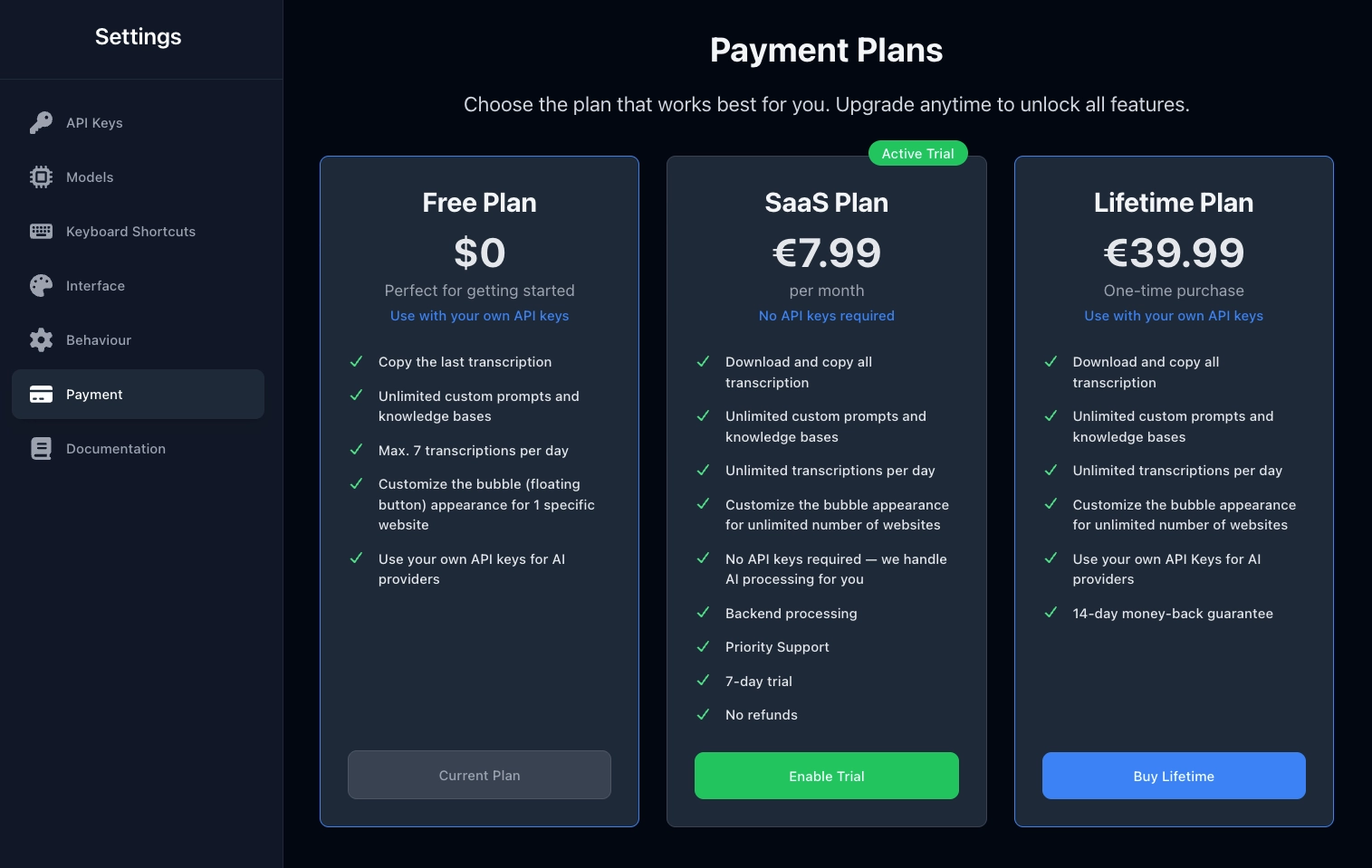
- The API Keys tab is no longer needed
- Start using VoxWrite with subscription benefits
Why Switch Plans?
Switch to Lifetime Plan when:
- You want full control over AI costs
- You have existing API credits to use
- You prefer pay-as-you-go pricing
- You want to use specific AI models or providers
Switch to Subscription Plan when:
- You want predictable monthly costs
- You don't want to manage API keys
- You want hassle-free setup
- You prefer we handle all technical details
Important Notes
✅ What Happens When You Switch
- Your settings and preferences are preserved
- Custom prompts and rules remain saved
- Recording history stays intact
- No data is lost
⚠️ Things to Keep in Mind
- Subscription → Lifetime: You'll need to add your own API keys before recording
- Lifetime → Subscription: Your API keys remain saved but won't be used
- Active subscriptions: If you have an active paid subscription and switch to Lifetime, your subscription continues until the end of the billing period
Frequently Asked Questions
Can I switch plans anytime?
Yes! You can switch between plans as often as you need. There are no restrictions or cooldown periods.
Will I lose my data when switching?
No. All your settings, custom prompts, and preferences are preserved when switching plans.
What happens to my subscription if I switch to Lifetime Plan?
Your subscription remains active until the end of your current billing period. You won't be charged again unless you manually re-enable the subscription.
Can I use both plans simultaneously?
No. Only one plan can be active at a time. However, you can switch between them instantly whenever you need.
Do I need to reconfigure settings after switching?
No. All your VoxWrite settings remain the same. The only thing that changes is how AI processing is handled (our servers vs. your API keys).
Need Help?
If you have any questions about switching plans or need assistance:
📧 Email: [email protected] 📚 Related Guides:
That's it! Switching between plans in VoxWrite is quick and easy. Choose the plan that works best for your current needs, and switch anytime without losing your data or settings.