
How to Turn Voice Notes Into 10 Pieces of Content: The Voice-First Repurposing Guide
Last updated: May 2026 | Reading time: 12 minutes
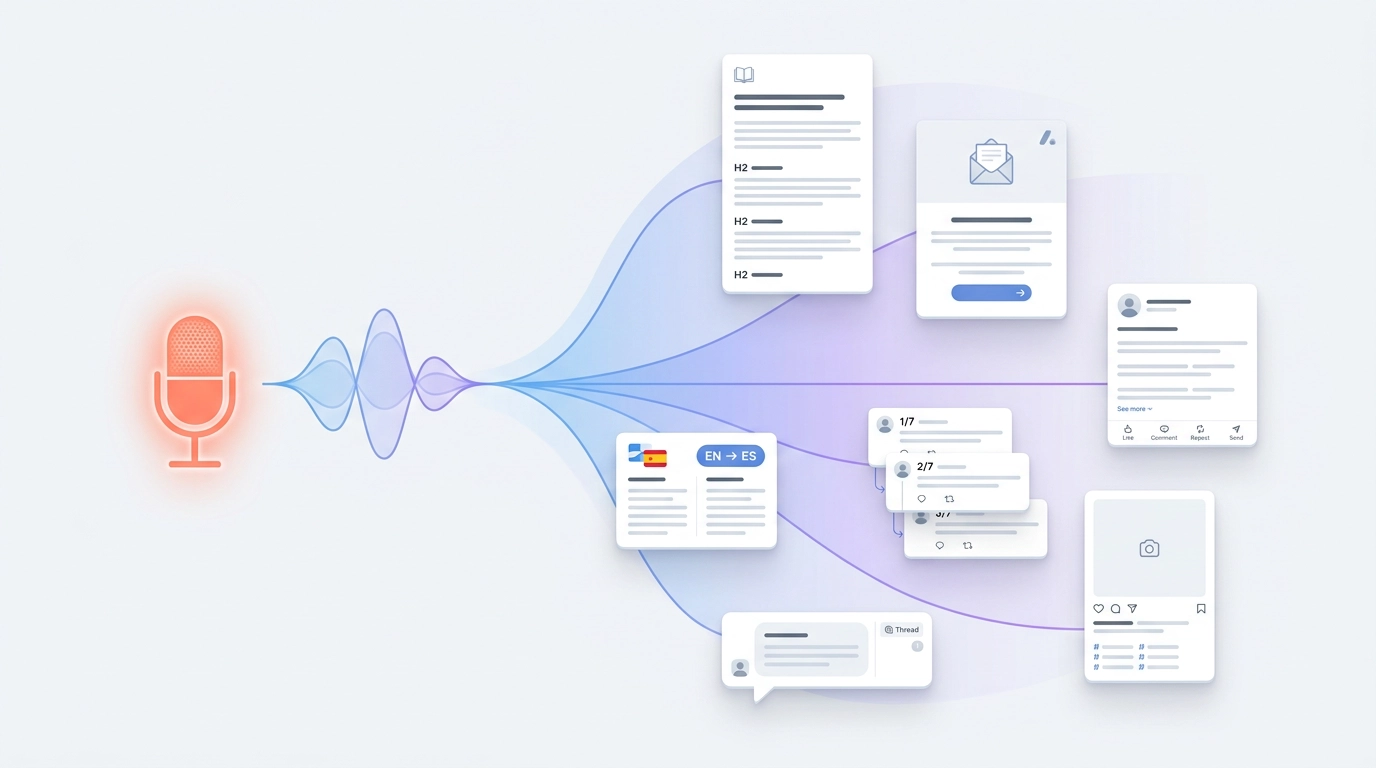
One Idea. Ten Outputs. The Math That Changes Everything.
Most creators write one piece of content, post it, and move on. A few hours of work, one channel, one chance to be seen. Then they sit down a week later, blank page again, starting from zero.
The voice-first creators do the opposite. They capture an idea once — a focused 10-minute dictation, or a phone memo on a walk — and then publish it across eight to ten channels by re-dictating the same idea through different AI presets. Each platform gets a native version. Same week. Same idea. No rewriting from scratch.
The math is simple. Speaking is roughly 3.5x faster than typing — a Stanford study measured speech input at about three times the speed of typing, even on a smartphone keyboard. Layer AI presets on top of speech and you get a second multiplier: the same idea, re-spoken into different fields with different recipes selected, becomes platform-native content without you ever drafting and re-drafting. The result is the voice first content repurposing strategy — a workflow where the idea is the asset and every published piece is a preset-driven dictation of that idea.
VoxWrite is built specifically for this loop. Pick a preset. Press the mic. Say what you think. Clean, formatted output appears directly in the input field — a business email in Gmail, a polished post on LinkedIn, a support reply in your help desk, a translation in Slack. This guide is the complete playbook.
Why "Write Once, Adapt Everywhere" Quietly Fails
The classic content repurposing advice — popularized by outlets like the Content Marketing Institute — is to write a long blog post, then chop it into smaller pieces for social. It sounds clean. In practice it has three problems:
- The blog post format constrains the source. Once you've shaped your thinking around H2s, intros, and conclusions, the energy of the original idea has been smoothed out. The LinkedIn post extracted from it sounds like a LinkedIn post extracted from a blog post. Flat.
- Writing is slow. A 1,500-word blog post takes most writers 3–5 hours. By the time you're chopping it for social, you've already used your weekly content budget.
- The platforms want different shapes. A LinkedIn post is not a shortened essay. A support reply is not a shortened essay either. They have their own grammar, and "adapt" usually doesn't capture that.
The voice-first approach fixes all three. Speaking is fast. AI presets reshape the same spoken idea into platform-native formats automatically. And because each preset is dialed for its target platform, the LinkedIn post sounds like a LinkedIn post, the email sounds like an email, the Slack reply sounds like Slack — without you toggling between drafts.
The Core Workflow: One Idea, Many Presets
Here is the voice to text content creation workflow in five steps.
Step 1: Pick One Idea Per Session
Don't try to cover three topics. The session compresses if you stay on one idea — a single insight, a single argument, a single story. That focus is what makes every downstream output sharp.
Step 2: Capture the Idea Once (Optional but Useful)
You don't need to record audio first — you can speak directly into each destination app. But many creators find it helpful to capture the idea once in a focused dictation as a "source of truth" they can refer back to:
- Desktop session (recommended). Open a Google Doc on your laptop, install VoxWrite on Chrome, Edge, or Brave, hit your hotkey, and speak for 8–12 minutes. VoxWrite removes filler words ("um," "uh," "like," "you know") and fixes grammar in real time. The transcript is already publishable English.
- Phone memo for mobile moments. VoxWrite is a desktop-only Chrome extension — there is no iOS or Android app. If your best ideas hit on walks or commutes, record them with your phone's built-in voice memo app. The recording is a memory aid; you'll re-dictate it through VoxWrite when you're at your desk.
Step 3: Pick or Build Your Presets
VoxWrite ships with smart presets — pre-built AI recipes that reshape what you say into what you actually need:
- Business Messages — Talk through your thoughts casually; get a clean email with proper sign-off in Gmail or Outlook.
- LinkedIn Posts — Ramble about an idea for 30 seconds; get a compelling post with hooks and formatting.
- Support Replies — Describe the solution in your own words; get an empathetic, consistent response ready to send.
- Translate and Adapt — Say something in one language; get output in another with the right register, across 50+ languages with style preservation.
- Meeting Notes — Dictate raw notes from a call; get organized bullet points with action items.
- Casual to Formal — Say it the way you think; get it the way it should be drafted.
- Custom Recipes — Build your own for blog posts, newsletter sections, X/Twitter threads, Instagram captions, podcast outlines, anything.
Spend 30 minutes once on a Sunday creating the custom recipes you'll lean on for content (blog post, newsletter, social post, etc.). Setup details for presets and per-website rules are in the custom rules documentation.
Step 4: Speak the Idea Into Each Destination
This is where the multiplication happens. Open the app where the piece will be published — your CMS, Gmail, LinkedIn, Slack, your help desk — and press the mic with the matching preset selected. Speak the idea (60–120 seconds is enough for most platforms; longer for blog posts and newsletters). The output lands directly in the input field, already shaped for that platform.
VoxWrite remembers per-website rules, so the right preset is applied automatically when you press the mic on each site. You don't pick the preset every time — the website picks it for you.
Step 5: Light Edit and Publish
AI cleanup is good, not perfect. Spend 5–10 minutes per output adjusting the headline, tightening the open, double-checking links and stats. Then publish across channels on your normal cadence.
The whole loop — capture, re-dictate per platform, edit, publish — fits in a single 90-minute working session. That same 90 minutes used to produce one blog post.
Concrete Example: One Idea, Eight Pieces of Content
Say you're a B2B SaaS founder and your idea is: "Free trials are killing our conversion rate. We're switching to reverse trials and here's why."
You sit down at your desk on Monday morning. Your full session looks like this:
- Open Google Docs. Press the VoxWrite mic with a long-form recipe selected. Talk for 12 minutes about the data, the experiment, the result, and what you'd tell another founder. You now have a clean ~1,800 word reference doc — already de-um'd, grammar-corrected, and structured.
- Open your CMS. With the blog-post recipe active, press the mic and re-dictate the strongest version of the argument for readers. ~10 minutes. A structured blog post draft appears.
- Open your newsletter editor. With the newsletter preset, press the mic and tell the same story in a more personal voice. 4 minutes. Newsletter draft appears.
- Open LinkedIn. With the LinkedIn Posts preset, press the mic and dictate a short, hook-led version. 60 seconds. Polished post appears.
- Open X/Twitter. Custom thread recipe. 90 seconds. Numbered thread appears.
- Open Instagram. Caption recipe. 45 seconds. Hook + story + hashtags appear.
- Open Slack to share with relevant founder communities. With the Slack reply preset, dictate a casual version. 30 seconds.
- Translate the LinkedIn post into Spanish for a different audience using the Translate and Adapt preset. 30 seconds.
Total time: roughly 90 minutes from "first mic press" to "everything scheduled." The same insight reaches eight different audiences in their preferred format.
For a deeper look at the dictation half of this loop, see Dictate Blog Posts: From Voice to Published Content.
How to Repurpose Voice Recordings Into Multiple Formats
Here is how to repurpose voice recordings into multiple formats as a checklist you can run every time:
| Step | Action | Time |
|---|---|---|
| 1 | Capture the idea once at your desk (optional reference doc) or via phone memo | 10–15 min |
| 2 | Open your CMS, press mic with blog-post preset, re-dictate | 10 min |
| 3 | Open newsletter editor, press mic with newsletter preset | 4 min |
| 4 | Open LinkedIn, press mic with LinkedIn Posts preset | 1 min |
| 5 | Open X/Twitter, press mic with thread recipe | 2 min |
| 6 | Open Instagram / YouTube / Threads, press mic with the matching recipe | 2 min |
| 7 | Light editorial pass on each output | 30 min |
| 8 | Schedule across channels | 15 min |
Total: about 70–90 minutes for 6–10 platform-native pieces of content.
How to Repurpose a Podcast Into a Blog Post With AI
Podcasters are sitting on the richest possible source material — hours of recorded thinking, often with guests, almost never repurposed beyond the audio itself.
To repurpose a podcast into a blog post with AI:
- Listen back to the episode (or skim the transcript) at your laptop. Note the strongest 2–3 ideas.
- Open your CMS in Chrome, Edge, or Brave.
- Select VoxWrite's blog-post recipe (a custom one you've built for long-form content).
- Press the mic and re-dictate the strongest argument as if you were explaining it to a reader who hadn't heard the episode. 8–12 minutes is plenty. The recipe shapes your speech into a structured post with intro, sections, and conclusion.
- Repeat with other presets in their respective apps. Open LinkedIn → dictate the same idea with the LinkedIn Posts preset. Open Slack → dictate a casual version with the Slack reply preset. Open X → custom thread recipe.
- Add the audio embed to the blog post. Now it serves both readers and listeners.
This single workflow doubles the lifetime value of every episode. Old episodes can be re-mined whenever a topic resurfaces — a 2024 episode becomes a fresh 2026 LinkedIn post in under five minutes.
Voice Notes to Social Media Content (Without Sounding Generic)
The mistake most creators make with voice notes to social media content is using one generic "make this a social post" approach across every platform. The result is bland — the kind of post that reads like AI wrote it, because nothing distinguishes it from any other AI post.
The fix is platform-specific presets. Each one is a recipe dialed for that channel:
- LinkedIn rewards single-sentence paragraphs, a strong hook, and a question or CTA at the end. VoxWrite's LinkedIn Posts preset handles all of this. See Dictate LinkedIn Posts with Your Voice for the full guide.
- X/Twitter rewards punchy, slightly contrarian openers and short threads. A custom thread recipe gives you 7–10 tweets, each under 270 characters, with a hook in the first.
- Instagram captions reward storytelling. A custom caption recipe outputs a hook line, a short narrative, and 3–5 hashtags.
- Threads rewards casual, conversational tone — closer to a personal text than a LinkedIn post.
- Substack Notes rewards opinion and short-form thinking.
Build one recipe per platform once, and the same idea — re-dictated in 30–60 seconds per channel — produces five distinctly platform-native posts. Full breakdown by channel: Social Media Content Creation: Dictate Captions and Posts.
The Voice Memo to Newsletter Workflow
Newsletters are the highest-ROI long-form channel for most operators — direct distribution, no algorithm, compounding list growth. They are also the channel most people abandon, because writing a newsletter from scratch every week is brutal.
The voice memo to newsletter workflow removes that friction:
- Pick a weekly theme on Monday. One idea per week. Write the theme as a single sentence in your notes app.
- Wednesday morning, open your newsletter editor in Chrome.
- Select your newsletter recipe (a custom one you've tuned for hook, body, CTA structure).
- Press the mic and talk through the theme for 8–12 minutes. No script — just talk through it the way you'd explain it to a friend. VoxWrite removes the "ums," fixes grammar, and shapes your speech into a structured newsletter draft.
- Edit for 20 minutes. Sharpen the open, fix any factual claims, add one link.
- Schedule. Done by Wednesday lunch.
- Same idea, blog version. Open your CMS later that day, select the blog-post recipe, and re-dictate the longer version for SEO.
- Same idea, social. Open LinkedIn, X, and Instagram, dictate 60-second versions through each preset on Friday.
One Wednesday morning becomes the week's newsletter, blog post, and social. Total weekly content time drops from 8–10 hours to 2–3.
Capturing Ideas When You're Not at Your Desk
Honest limitation: VoxWrite is a Chrome browser extension that only runs on desktop and laptop computers (Chrome, Edge, Brave). There is no mobile app — no iOS, no Android. That is a real constraint for anyone whose best ideas hit on walks, runs, school pickups, or commutes.
Here is the hybrid workflow that works around it:
The Phone-as-Memory-Aid Loop
- Capture on your phone. When the idea hits, open your phone's built-in Voice Memos (iPhone) or Recorder (Android) app and talk for 3–10 minutes. Don't try to be polished. Just get the idea down.
- Auto-sync the audio. iCloud, Google Drive, or Dropbox will get the file to your laptop within minutes.
- At your desk, replay the memo while you re-dictate. Listen to your own captured idea as a memory prompt, then press the VoxWrite mic in your destination app (Google Docs, your CMS, LinkedIn) with the right preset selected.
- Re-dictate through each preset for each output format — same idea, different platforms, different presets.
The phone recording is a memory aid, not a transcript-to-be-transformed. The actual content generation happens in VoxWrite when you re-dictate at your desk. Many heavy users record 5–10 short voice memos throughout the week and batch-process them on Friday by sitting down and re-dictating each one through their content presets.
For more on the voice-first capture mindset, see Hands-Free Voice Typing for Commutes and Multitasking.
What Makes VoxWrite a Good Fit for This Workflow
Plenty of tools transcribe audio. The repurposing workflow is what's hard, and it depends on three things being in one place.
Smart Presets That Reshape Speech Into Output Formats
VoxWrite isn't basic dictation. Every preset is a pre-built AI recipe — Business Email, LinkedIn Post, Slack Reply, Translate and Adapt, Meeting Notes, Casual to Formal, plus any custom recipes you build. Press the mic, talk naturally, get the format you actually need.
Per-Website Rules Remembered Automatically
The same idea becomes a polished email in Gmail, a hook-led post on LinkedIn, a casual reply in Slack — automatically, because each site has its own preset attached. You don't pick the preset every time. The site picks it for you.
Filler Word Removal and Grammar Correction Built In
Raw speech is full of "um," "uh," "you know," half-finished sentences, and circular phrasing. VoxWrite's AI cleanup fixes this in real time, so the output is already publishable English. Deep dive: The Complete Guide to Removing Filler Words.
Custom Recipes for Anything
The built-in presets cover the common cases. Custom recipes cover everything else — blog post structure, newsletter section, X thread, Instagram caption, product description, podcast show notes. Build once, reuse forever. See Voice Typing With Templates: Dictate Perfectly Formatted Output.
Translate Across 50+ Languages With Style Preservation
The Translate and Adapt preset means a single idea can reach English, Spanish, German, French, Portuguese, Mandarin, and 45+ more languages — at the right register for each. Bilingual creators dictate in their strongest language and let VoxWrite hand them an English version directly into LinkedIn or Gmail.
Bring Your Own API Key (BYOK) — OpenAI, Claude, or Gemini
Connect your OpenAI, Anthropic Claude, or Google Gemini API key directly. Your data goes to the provider you choose; nothing is stored on VoxWrite's side. You control the model, the spend, and the privacy posture. A simple subscription plan is also available if you'd rather have everything included. More: Why BYOK AI Tools Are the Future of Private Writing.
Works Inside Every App You Already Publish In
Gmail, Google Docs, Notion, LinkedIn, Slack, X, Substack, Ghost, WordPress, your help desk, your CRM. The dictation and the AI shaping happen in the input field where the publishing happens — no copy-paste, no extra tab, no second tool.
Voice-First vs. Write-First: A Direct Comparison
| Factor | Write-First (typing) | Voice-First (VoxWrite) |
|---|---|---|
| Capture speed | 40 WPM typing | 150 WPM speaking |
| Source freshness | Pre-shaped by the format you're writing in | Raw thinking, shaped per platform by presets |
| Outputs per idea | Usually 1, occasionally 2–3 with manual rewriting | 6–10 platform-native pieces from one idea |
| Time per piece | 2–4 hours each | 30 seconds to 10 minutes per platform |
| Tone consistency across channels | Drifts as you tire | Driven by per-website presets |
| Mobile capture | Awkward typing on a phone | Phone memo as memory aid → desktop re-dictation |
| Weekly publishing volume | 1–2 pieces realistic | 5–10 pieces realistic |
Setup Checklist: Run Your First Repurposing Session This Week
1. Install VoxWrite
Install from the Chrome Web Store or the Edge Add-ons Store. Desktop only — Chrome, Edge, or Brave on your laptop.
2. Connect Your API Key (or Subscribe)
Plug in your OpenAI, Claude, or Gemini key for full BYOK control over model, spend, and data. Or pick the all-included subscription if you'd rather not manage a key.
3. Set a Hotkey
Bind recording to a single key so you can hit it the moment an idea forms. Setup: hotkeys documentation.
4. Pick Your Built-in Presets and Build Three Custom Recipes
Activate the built-in presets you'll use most — Business Messages, LinkedIn Posts, Slack Replies, Translate and Adapt. Then build three custom recipes for content: blog post, newsletter, X thread. 30 minutes of setup, used for every session that follows.
5. Attach Per-Website Rules
Tell VoxWrite which preset to apply automatically on each site — Gmail → Business Messages, linkedin.com → LinkedIn Posts, your CMS → blog post recipe. Now the right preset is always live when you press the mic. Walkthrough: custom rules documentation.
6. Run Your First Session
Pick one idea you know cold. Open Google Docs, dictate a 10-minute reference take. Then open LinkedIn, X, your newsletter editor, and your CMS in turn. Press the mic in each and re-dictate the same idea. Watch one idea become five different outputs in under an hour.
What to Expect in the First Month
Your weekly content output will roughly 4x. Same hours, four times the published pieces. Most creators are skeptical until they see the first session.
Tone consistency improves. The per-website presets enforce a consistent voice across channels — something even most full-time content teams struggle with manually.
You'll start recording more, writing less. The capture phase shifts to your phone for ideas-in-the-wild and to your desktop for focused 10-minute takes. The "writing" you do collapses to editorial passes on AI-shaped drafts.
You'll mine your archive. Old podcast episodes, old meeting recordings, old voice memos suddenly become source material. Many users find their best content of the year comes from a recording they'd half-forgotten.
Frequently Asked Questions
How do I turn voice notes into blog posts?
To turn voice notes into blog posts, open your CMS or Google Docs in Chrome, select VoxWrite's blog-post preset (or a custom recipe), press the mic, and speak for 8–12 minutes. The preset removes filler words, fixes grammar, and outputs a structured draft directly in the input field.
Can I convert voice memos to content automatically?
Yes. The fastest way to convert voice memos to content is to speak directly into the destination app with the right VoxWrite preset selected. For phone-captured ideas, replay the memo at your desk and re-dictate the key points through VoxWrite — the recording is a memory aid, not a transcript to transform.
How do I repurpose a podcast into a blog post with AI?
To repurpose a podcast into a blog post with AI, listen back to the episode, then open your CMS in Chrome, select a blog-post recipe in VoxWrite, and re-dictate the strongest argument as if you were explaining it to a reader. Repeat with the LinkedIn and Slack presets in their apps to extend the same idea across channels.
How do I turn voice notes into social media content?
Speak the same idea into each platform with the matching VoxWrite preset. Voice notes to social media content works best with one preset per platform — LinkedIn Posts, a custom thread recipe for X, a custom caption recipe for Instagram — auto-applied via per-website rules.
What is a voice memo to newsletter workflow?
A voice memo to newsletter workflow is a weekly habit: theme on Monday, sit at your desk Wednesday, open your newsletter editor, select the newsletter recipe, press the mic, and talk through the theme for 8–12 minutes. The recipe shapes your speech into hook, body, and CTA.
How do I repurpose voice recordings into multiple formats?
How to repurpose voice recordings into multiple formats: build one VoxWrite preset per format, attach per-website rules so the right preset auto-applies, then open each destination app and re-dictate the same idea. One idea → blog post + newsletter + LinkedIn post + thread + caption + translation in under 90 minutes.
What is a voice to text content creation workflow?
A voice to text content creation workflow replaces typing with speaking and uses AI presets to handle tone, structure, and formatting. VoxWrite is purpose-built for this: Chrome extension, smart presets, custom recipes, per-website rules, and BYOK privacy via OpenAI, Claude, or Gemini.
Can I dictate a blog post with voice and AI in one pass?
Yes. Dictate blog post with voice and AI in one session by opening your CMS or Google Docs in Chrome, selecting a blog-post preset, pressing the mic, and speaking 8–12 minutes. The output is a 1,200–1,800 word draft with structure, headings, and clean prose ready for a quick edit.
How do I turn audio ideas into written content?
Turn audio ideas into written content by treating any audio capture (a phone memo, a podcast episode) as a memory aid, then re-dictating the idea through VoxWrite presets in the destination app. The audio holds the idea; the presets handle the packaging.
What is the voice first content repurposing strategy?
The voice first content repurposing strategy is to capture an idea once and publish it across every channel by re-dictating it through different VoxWrite presets. The idea is the asset; the presets multiply it into platform-native formats automatically.
Does VoxWrite work on phones for capturing voice notes?
No. VoxWrite is a desktop browser extension (Chrome, Edge, Brave) — there is no iOS or Android app. For mobile capture, record with your phone's built-in voice memo app and use the recording as a memory prompt when you re-dictate at your computer through the right VoxWrite preset.
Conclusion: Stop Writing One Thing at a Time
The creators who publish the most are not the fastest typists or the hardest workers. They are the ones who figured out that one strong idea can become a week's worth of content, if the right presets shape it for each platform.
That used to require a content team. It now requires a Chrome extension, a focused 15 minutes, and a handful of presets dialed in for the channels you publish on.
The idea is the asset. Every preset is a multiplier.
Ready to turn one idea into ten pieces of content?
Try VoxWrite Free for 7 Days — No credit card required. Desktop Chrome, Edge, or Brave only.
Related Articles
- Dictate Blog Posts: From Voice to Published Content
- Dictate LinkedIn Posts with Your Voice: Create Thought Leadership Content 4x Faster
- Social Media Content Creation: Dictate Captions and Posts
- Voice Typing With Templates: Dictate Perfectly Formatted Output
- The Complete Guide to Removing Filler Words From Text
About the Author: This guide was created by the VoxWrite team.
Last Updated: May 2026